
Brand managers, ecommerce teams, and product marketers often need professional product visuals before a physical product is ready to film. Traditional shoots can also become expensive when products have multiple variations, complex internal parts, or features a camera cannot capture. 3D product animation offers an alternative: a computer-generated video built from a digital model, allowing brands to control every angle, material, and movement. At Unboxed, our 3D modeling and animation capabilities help businesses turn concepts into visual content for marketing and product communication. This guide explains when CGI makes sense, what you need to prepare, how production works, and what determines the cost.
What Is 3D Product Animation?
3D product animation is a computer-generated video that brings a digital product model to life through realistic lighting, materials, camera movements, and motion. Unlike traditional product filming, it can show products that have not been manufactured, reveal hidden components, demonstrate mechanical functions, and create precise visuals without a physical camera.
You’ve probably encountered 3D product animation in smartphone launch videos, headphone advertisements, cosmetic product campaigns, and appliance commercials that reveal internal mechanisms.
Businesses use it for several reasons. A hardware startup can demonstrate an upcoming product before manufacturing begins. An ecommerce brand can showcase multiple colors without photographing every variation. A manufacturer can explain complicated machinery using animated cutaway views.
3D Product Animation vs 3D Product Rendering
Although the terms are sometimes used interchangeably, they describe different deliverables.
3D product rendering creates a static computer-generated image of a product. It is commonly used for ecommerce listings, packaging previews, catalogs, and advertising images.
3D product animation adds movement, allowing the product, camera, or individual components to move over time.
Both can use the same underlying 3D model, making it possible to create still images and videos from one digital asset.
3D Product Animation vs Filming Your Product
Choosing between a CGI product video and a traditional shoot depends on the product, campaign objectives, and available resources.
| Factor | 3D Product Animation | Traditional Product Shoot |
| Product availability | Can visualize products before manufacturing | Generally requires a physical product or prototype |
| Internal components | Can reveal hidden mechanisms through cutaways | Limited without disassembly or specialized filming |
| Colors and variations | Materials and colors can be changed digitally | Often requires additional samples or reshoots |
| Lighting and finish | Precise, repeatable digital control | Professional lighting, but physical conditions remain relevant |
| People using the product | Possible, but realistic humans add complexity | Better for natural human interaction |
| Reusing assets | Models can generate new angles, images, and animations | Existing footage can be edited, but new shots may require filming |
| Main cost drivers | Modeling, materials, animation, rendering, and revisions | Crew, equipment, talent, location, and shoot days |
When CGI Is the Better Choice
3D animation is particularly useful when a product is unavailable, has multiple configurations, or requires visual demonstrations that would be difficult to film.
For example, a company launching a new electric appliance could use an exploded-view animation to show its motor, airflow, and internal components before presenting the finished product.
When Traditional Filming Works Better
Live-action footage is often preferable when authentic human interaction, physical environments, or natural product textures are central to the message.
A food brand showing freshly prepared meals may benefit more from real photography than photorealistic simulation.
Some campaigns combine the two approaches. Through visual effects and VFX production, CGI elements can be integrated into filmed footage.
If you’re still comparing animation formats, our guide to 2D vs 3D animation explains their broader differences.
Types of 3D Product Animation and Their Uses
Different animation formats serve different marketing and communication goals.
1. Product Launch and Hero Videos
A hero video introduces a product through cinematic lighting, close-ups, controlled camera movements, and carefully planned transitions.
These animations work well for product launch pages, advertising campaigns, crowdfunding presentations, and trade shows.
2. Exploded Views and Technical Animations
An exploded-view animation separates individual components to explain construction, assembly, or internal operation.
Manufacturers, electronics companies, and engineering businesses use these animations to communicate features that conventional product photography cannot reveal.
3. Feature Demonstration Videos
Feature animations focus on individual product benefits, such as a rotating mechanism, waterproof seal, or advanced cooling system.
Short clips can communicate one feature at a time without overwhelming the viewer.
For simpler visual explanations, motion graphics can combine animated typography, icons, and diagrams with product footage.
4. Ecommerce Product Spins
A 360-degree animation rotates a product to display its shape, finishes, and details.
These videos can support Shopify product pages, ecommerce advertising, and compatible marketplace listings. Interactive 360 viewers are a related deliverable and may require additional implementation.
5. Assembly and Instructional Animation
Instructional animations demonstrate installation, operation, maintenance, or product assembly.
They are particularly valuable for products that require technical explanation or contain components that are difficult to access.
6. Packaging and Unboxing Animation
Packaging animations digitally demonstrate how a product is presented, opened, and removed from its packaging.
They are useful for launch presentations and packaging approvals. Brands developing new packaging can also coordinate the animation with packaging and label design.
7. Interactive 3D and Augmented Reality
Interactive 3D experiences allow users to rotate or inspect products digitally. Augmented reality can place suitable digital models within a customer’s physical surroundings.
These experiences require additional development beyond a standard rendered video and may involve AR/VR simulation services.
8. Social Media and Advertising Cut-Downs
A primary animation can be adapted into shorter assets for Instagram, TikTok, YouTube, and paid advertising.
Planning vertical and square versions before production helps ensure important product details remain visible in every format.
What Do You Need Before Starting a 3D Product Animation?
A production team can work more efficiently when the product specifications, brand assets, and campaign requirements are clear.
Prepare the following checklist before requesting a quote:
- CAD or existing 3D files: STEP, IGES, OBJ, or FBX files can provide useful geometry and reduce modeling work. Engineering files may still require cleanup.
- Physical samples or reference images: If CAD is unavailable, provide detailed photographs, measurements, and technical drawings.
- Material specifications: Include exact colors, textures, metal finishes, transparency, and gloss levels.
- Logos and label artwork: Supply vector files where possible to maintain accuracy.
- Brand guidelines: Include approved colors, fonts, and visual references.
- Priority product features: Identify the three to five most important benefits the animation must communicate.
- Distribution requirements: Specify whether the video is for a website, marketplace, social platform, presentation, or trade show.
- Creative references: Share examples demonstrating the desired lighting, animation style, pacing, and overall quality.
Why CAD Files Matter
CAD files can significantly influence project cost and accuracy because they provide a starting point for the product’s geometry.
However, CAD does not automatically mean production-ready animation assets. Models may still need optimization, retopology, part separation, UV mapping, and material development.
Without existing geometry, artists must reconstruct the product from references, increasing preparation time.
How to Write a Brief That Gets an Accurate Quote
A useful brief should explain the audience, product features, visual style, intended video length, delivery formats, and deadline.
Instead of requesting “a premium 3D video,” describe what the animation needs to achieve.
For example:
“We need a 30-second product launch animation showing three key features of a new wireless speaker, with a 16:9 website version and a 9:16 social media version.”
That provides a much clearer starting point for estimating production requirements.
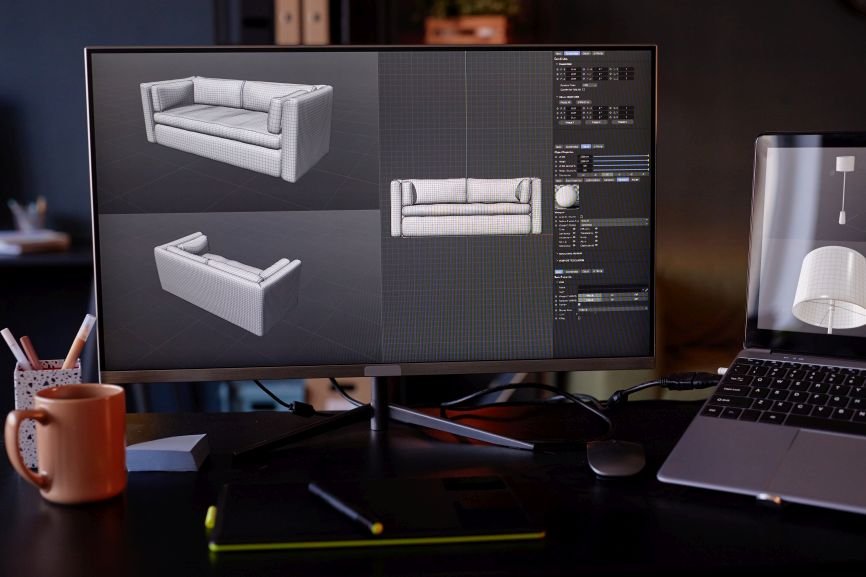
How Is a 3D Product Animation Made?
Professional 3D product animation usually follows a structured production process involving concept development, modeling, visual approval, animation, rendering, and post-production.
Step 1: Creative Brief and Script
The team identifies the video’s objective, audience, main messages, and required deliverables.
A script, storyboard, or shot list establishes what viewers should see and understand at each stage.
Step 2: 3D Modeling
Artists prepare the product model using CAD, technical drawings, photographs, or physical references.
Separate components may need to be modeled or prepared individually if the animation includes mechanical movement or exploded views.
Step 3: Materials and Lighting
Materials determine how product surfaces respond to light.
For example, polished metal, matte plastic, transparent glass, and textured fabric each require different settings.
Lighting and camera composition are developed to establish the desired visual style.
Step 4: Still-Frame Approval
Before significant animation work begins, the client reviews representative still images.
This is a critical approval stage because correcting inaccurate materials, geometry, labels, or finishes early is generally easier than changing completed animated sequences.
Step 5: Animation and Camera Movement
Artists create the required movements, including product rotations, mechanical demonstrations, component separation, and camera transitions.
Complex scenes may also require simulations for liquids, particles, cloth, or other physical effects.
Step 6: Rendering
Rendering converts the completed 3D scenes into individual image frames.
Highly reflective materials, complex lighting, detailed environments, and high resolutions can increase rendering requirements.
Step 7: Editing, Sound, and Delivery
Rendered sequences are assembled into the final video, with sound design, music, typography, and other graphics added where appropriate.
The completed animation is exported in the agreed resolutions and aspect ratios.
How Much Does 3D Product Animation Cost?
Professional 3D product animation can cost anywhere from a few thousand dollars to $50,000 or more, depending on complexity and production requirements. Short product loops with existing models typically cost less than cinematic campaigns involving detailed environments, simulations, and multiple deliverables.
Published 2026 studio guides illustrate the variation:
- Animate & Create describes a broad market range of approximately 500–10,000+ per finished minute, with highly complex work exceeding that range.
- Lucid Motion Studio describes custom 3D work starting around $10,000 per minute, with broadcast-quality productions exceeding $50,000 per minute.
- BIRAN’s published pricing lists a 30-second CGI product video at $8,000, assuming a usable product model is supplied.
These are examples from independent providers, not standardized US industry rates or Unboxed prices. Different providers include different services, so estimates should be compared by scope rather than duration alone.
What Determines 3D Product Animation Cost?
Existing 3D models: A usable digital model can reduce preparation work, while modeling from photographs or measurements adds labor.
Product complexity: A simple bottle requires different modeling and animation work from a machine containing dozens of moving components.
Materials and realism: Glass, liquids, fabric, transparent plastics, and realistic reflections can require more development and rendering.
Video length and shot count: Longer projects can increase costs, but a short film with numerous complex shots may be more expensive than a longer, simpler animation.
Background and environment: A plain studio backdrop generally requires less work than a detailed virtual environment.
Product variations: Additional colors or finishes may be relatively efficient once the original model is approved, while structural changes require more modeling.
Revisions and deliverables: Extra revision rounds, alternate edits, and multiple aspect ratios can affect the overall quote.
How to Reduce Costs Without Sacrificing Quality
Start by supplying accurate product references and agreeing on the most important features.
A focused animation with fewer, stronger shots may communicate the product more effectively than a longer film trying to demonstrate everything.
Approving materials and still frames before animation begins also reduces the likelihood of expensive late changes.
When comparing 3D product animation services, request an itemized scope showing the included production stages, revision allowance, deliverables, and source-file arrangements.
How Long Does 3D Product Animation Take?
A 30- to 60-second 3D product animation may take approximately two to eight weeks, depending on available models, shot complexity, rendering requirements, and feedback cycles.
For example, MBM Studio publishes a typical turnaround of two to four weeks for a 30- to 60-second product commercial.
More complex projects, especially those requiring original product modeling, elaborate environments, or technical simulations, may take eight to twelve weeks or longer.
The most common causes of delays include missing specifications, extensive modeling, slow approvals, difficult rendering, and late changes to the product design.
Brands working toward a launch deadline should allow time for internal review and final exports, rather than treating the animation completion date as the campaign launch date.
How to Choose a 3D Product Animation Provider
Choosing a production partner involves more than comparing showreels or asking for a price per second.
Look for a team that understands both the technical requirements and the marketing objective.
Questions to Ask Before Hiring
Ask whether the team has relevant experience with your product type, particularly if the project involves mechanical components or unusual materials.
Find out whether the proposal includes modeling, rendering, sound, revisions, and every required format.
Also confirm who approves technical accuracy, what happens when the product design changes, and whether reusable 3D assets will be provided.
Warning Signs in Quotes and Portfolios
Be cautious when a quote does not define the production scope, deliverables, revision limits, or ownership terms.
A visually impressive portfolio may not demonstrate experience with technically accurate product animation. Ask how the team verifies dimensions, mechanisms, and material details.
Avoid judging solely by the lowest estimate. Compare what each provider is actually producing.
Getting More Value From Your 3D Product Model
A completed 3D model can support more than one video.
Depending on the source assets, quality, and licensing arrangements, brands may reuse it for product page renders, marketplace images, packaging mockups, 360-degree views, AR previews, trade show materials, and future advertising campaigns.
This is especially useful for businesses introducing new colors or product variations.
Instead of organizing a completely new shoot for every launch asset, the creative team may be able to update the original model, materials, or camera setup.
Unboxed provides 3D modeling and animation as part of its wider creative production capabilities. Explore our case studies to learn more about the agency’s work across different creative disciplines.
Common 3D Product Animation Mistakes to Avoid
Starting animation before visual approval: Confirm product geometry, materials, and labels before moving into time-intensive animation.
Providing vague references: Inaccurate color or finish information can result in unnecessary revisions.
Overloading the video with features: Prioritize the product’s strongest selling points and use additional clips for secondary details.
Ignoring social formats: Plan vertical, square, and widescreen versions before finalizing camera composition.
Forgetting source-file ownership: Agree on whether the final handover includes only rendered videos or also editable project files, models, textures, and associated usage rights.
Frequently Asked Questions
How Much Does a 3D Product Animation Cost?
Professional 3D product animation can cost several thousand dollars, while complex commercial productions can exceed $50,000. The final price depends on modeling requirements, realism, animation complexity, duration, rendering, revisions, and deliverables.
How Long Does It Take to Make a 3D Product Animation?
A straightforward 30- to 60-second animation may take two to four weeks, while more involved projects can require six to twelve weeks or longer. Existing product models and timely approvals can shorten production.
Do I Need CAD Files for a 3D Product Animation?
No. CAD files are helpful but not mandatory. Artists can build models from technical drawings, photographs, accurate measurements, or physical samples. Additional modeling work may increase the cost.
Is 3D Product Animation Cheaper Than a Live-Action Product Shoot?
It depends on the requirements. CGI may offer better value when a product is unavailable, has multiple variations, or needs complex internal demonstrations. A straightforward physical shoot can be more economical for products that already exist.
Can You Animate a Product That Has Not Been Manufactured Yet?
Yes. A product can be animated before manufacturing if sufficiently accurate design references are available. CAD models, engineering drawings, and detailed specifications help artists represent the intended product accurately.
What Files Will I Get at the End of the Project?
Typical deliverables include final video files in agreed resolutions and aspect ratios. Editable 3D models, project files, textures, still renders, and other source assets may be available depending on the contract. Confirm these requirements before production begins.
Make Your Next Product Launch Easier to Visualize
3D product animation gives brands greater control over how they present products, explain features, and prepare launch content, particularly when physical filming is impractical.
The most successful projects begin with accurate product information, a focused creative brief, and clear production approvals.
Whether you need a product launch video, technical demonstration, or reusable CGI assets, Unboxed offers 2D and 3D animation capabilities as part of its creative services.
Contact Unboxed to discuss your project requirements and request a tailored production quote.
Unboxed is ready to help you boost your sales. Call us +92 (307) 131 7777 or visit our office at Office 27, 3rd Floor, Pakland City Center, I-8 Markaz, Islamabad, Pakistan for a detailed consultation and quotes.
Reach us